
Greg Brockman, OpenAI’s CTO, recently wrote about how they’re retooling for agentic development. The short version: their engineers now talk to AI agents first, not their code editors. The AI writes the code, debugs it, handles operations. Humans direct and review.
This is the same approach we take at Refound, and the core reason why our company exists.
We’re running the whole company this way. Marketing, operations, client work, all of it. And I don’t mean “we use ChatGPT a lot.” I mean the AI agents have direct access to our systems and take action without me copy-pasting things between windows.
Let me show you what I mean.
The Problem With How Most People Use AI
I watch how people use AI at work and it drives me a little crazy. The workflow usually looks something like this:
Open ChatGPT. Type a prompt. Get some text back. Copy it. Switch to Gmail or WordPress or Google Docs or whatever. Paste. Tweak the formatting. Maybe go back to ChatGPT for another round.
The human has become a copy-paste monkey shuttling text between the AI and wherever the work actually needs to live.
6+ steps. Multiple tabs. And you’re the glue holding it all together.
This is fine, I guess. Better than not using AI at all. But you’re leaving so much on the table. Every copy-paste is friction. Every window switch is wasted time. And the AI can’t see the context of where that text is going, so it can’t actually help you as much as it could.
How We Do It Instead
Our website doesn’t run on WordPress or Webflow or any CMS. It’s pure code. Astro, if you’re curious.
Why? Because AI agents can work with code directly.
When I want to publish a blog post or update copy on a landing page, I don’t log into a dashboard. I talk to Claude Code, which has access to the whole codebase. I tell it what I want. It makes the changes, commits them, and deploys. I review and approve.
That’s it. No copying text between windows. No formatting headaches. No clicking through menus.
”Update the landing page copy and publish a blog post about our new feature.”
Agent working…
And because the agent can see the entire site, it knows how to keep things consistent. It sees the design system, the other pages, the existing content. When you’re copy-pasting from ChatGPT, all that context is lost.
Case Study: The Lenny Skills Database
If you’re reading this going, “so what? you save a few minutes here and there” you’re missing the second-order benefits. We’re now able to move faster than teams ten times our size.
A couple of weeks ago, Lenny Ratchitsky released all the transcripts for his podcast and invited people to make something from it. We sat down at Refound and came up with the idea to turn it all into Agent Skills that anyone could download. (You can browse the Lenny Skills database here.)
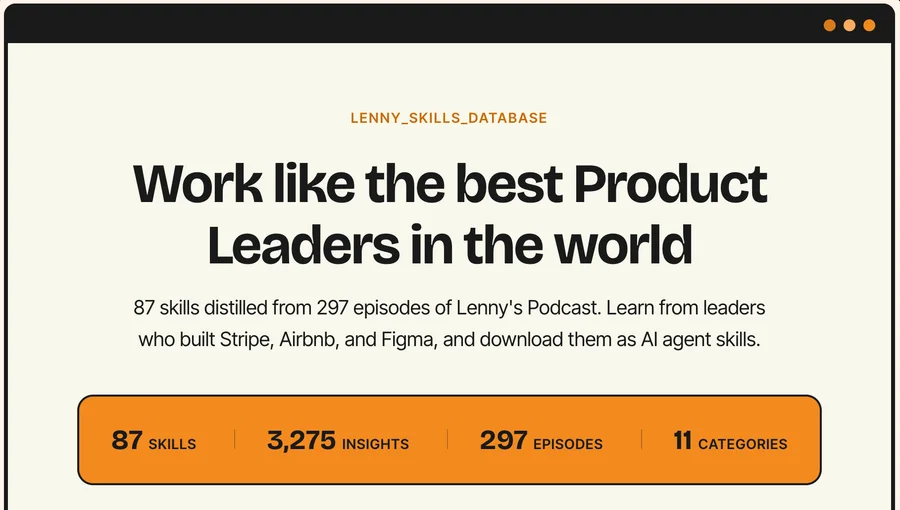
A project like this, parsing through hundreds of transcripts, extracting usable data, creating a whole mini-site with a new design system, is no small job. And yet we pulled it off in less than 24 hours. I’ve spoken to team ten times our size that take days to get a new landing page up.
The project went viral. We attracted thousands of visitors to our site on the first day alone and still get thousands every week. None of this would have happened if we were stuck in dashboards and ChatGPT.
This Isn’t Just About the Website
We’ve done the same thing across the company.
Deployments and infrastructure? AI agents handle it. They have access to our pipelines. I’m not copying commands from ChatGPT into my terminal like some kind of human middleware.
Operations stuff, like meeting notes and project tracking and follow-ups? AI processes and routes it automatically. I don’t manually enter data into five different systems anymore.
Content creation? Blog posts, social, marketing materials. The AI drafts from our documented guidelines and voice notes. I edit. The agent handles formatting and publishing.
The pattern is pretty simple: find anywhere a human is acting as a go-between, and give the AI direct access instead. If you want a full breakdown of the shape this takes — the parallel org chart, the shared context layer, and how to tell if your company is actually AI-native or just a tool-adopter — read what an AI-native company actually looks like.
I should be clear here. This doesn’t mean AI runs everything autonomously while I sit on a beach. I’m still making decisions, giving direction, reviewing output, catching mistakes. The difference is that I spend my time on the judgment calls instead of the mechanical work.
How to Actually Do This
The key mental shift is to treat AI as a coworker, not a tool. You tell it what you need, give it the right context and tools, it figures out how to do it, and your job is to review the work.
Here’s how:
First, find the friction points. Look for anywhere someone copies AI output and pastes it somewhere else. Every “I asked ChatGPT to write this and then put it in X” is a friction point. Make a list. You’ll probably find more than you expect.
Second, give AI direct access. For each friction point, figure out how to cut out the human intermediary.
Sometimes that means choosing different systems. We use a code-based website instead of a CMS specifically because AI can work with code directly.
Sometimes it means building integrations. Most business software has APIs. AI agents can use them. Your CRM, project management tool, whatever. The access is usually there if you set it up.
Sometimes it means picking tools that are built for AI access. Newer software increasingly assumes AI will interact with it, not just humans clicking around.
This takes real investment. You’re changing infrastructure. But it pays off every single day after.
Third, change how you work. Once AI has access to your systems, stop opening five different apps to do tasks. Talk to an AI agent that can reach all of them. Tell it what you want. Let it execute. Review what it does.
Takes some getting used to. You’re giving up direct control. But you’re trading busywork for leverage, and that trade is worth it.
This Is What Refounding Means
We called the company Refound because most organizations need to be rebuilt for AI, not just improved. Adding AI tools to existing workflows is incremental. Redesigning those workflows so AI can take action directly is rebuilding.
The payoff is that we can ship projects in an afternoon. A small team does the work that would normally need a bigger one. Quality goes up because AI has full context.
Every company will make this transition eventually. The question is whether you do it deliberately now or scramble to catch up later.
This is what we do with clients. We find the friction points, redesign the workflows, and actually implement it. Not strategy decks and handshakes. We build the infrastructure, set up the integrations, train the team.
If you’re thinking about this for your company, let’s talk.