
Your GTM team has a CRM. A sequencing tool. Call recording. LinkedIn Sales Navigator. Maybe an AI writing assistant on top of all that.
And your reps are still spending 70% of their time not selling.
I hear some version of this from almost every sales leader I talk to. They’ve invested in the stack. The tools are there. But the team is busy, not productive. Reps toggle between six or eight apps before they can write a single outreach email. Leads from last week’s event are sitting in someone’s inbox. The pipeline forecast is a work of fiction that nobody trusts.
The issue isn’t that you need better AI tools. You have plenty. The issue is that none of them talk to each other, none of them share context, and none of them know what’s happening in the rest of your sales motion.
What you need isn’t another tool. You need an operating model.
Your Sales Stack Is a Collection, Not a System
Here’s what a typical sales workflow looks like today. A rep has a call booked for 2pm. Starting around 1:30, they open Salesforce to check the account history. Then LinkedIn to look at the contact’s recent activity. Then the company website. Then Gong to replay clips from the last call. Then Slack to ask a colleague if they’ve talked to anyone at the account recently.
Fifteen minutes of tab-switching and context-gathering. For one call. Multiply that across 50 to 100 accounts per rep, and you’ve got a team that’s working hard but barely selling.
The lead problem is even worse. Inbound leads trickle in from events, website forms, referrals, outbound responses. They land in different places. A hot referral hits someone’s email on Friday afternoon and doesn’t get touched until Tuesday. By then, the prospect has moved on. There’s no SLA, no routing logic, and no one tracking what fell through the cracks.
Pipeline visibility? It’s a spreadsheet exercise. Reps manually update CRM fields when their manager nags them about it. The data is two weeks stale by the time it reaches the forecast. So leadership builds shadow trackers in Google Sheets, and nobody is looking at the same numbers.
And then there’s the knowledge problem. Your best rep knows which accounts are expanding, which deals have stalled, and which contacts respond to which messaging. When they’re on vacation or leave the company, all of that intelligence disappears. It lives in their head, not in any system.
These aren’t separate problems. They’re symptoms of the same root cause: your sales tools operate as isolated point solutions. Each one does its job fine in isolation. But there’s no intelligence connecting them. No shared context. No system that sees the full picture and acts on it.
Adding another AI tool to this stack doesn’t fix it. It makes it worse. One more login, one more tab, one more place where data lives in a silo.
What an AI Operating Model Actually Is
Think about what ERP did for manufacturing and finance in the 1990s. Before ERP, companies ran inventory management, procurement, accounting, and production planning as separate systems. Data lived in silos. Decisions were based on incomplete information. The breakthrough wasn’t any single tool. It was connecting everything into a shared system that could see across functions and coordinate accordingly.
An AI operating model does the same thing for your revenue operations. It’s a connected intelligence layer that sits across your entire GTM motion, from the moment a lead enters your world to the moment a client renews or expands.
The distinction that matters here is automation versus orchestration. Automation handles a task. It can enrich a lead record or draft an email. Orchestration handles a workflow end-to-end. It captures a lead, enriches it, scores it, routes it to the right rep, prepares a briefing for their first call, and then tracks the deal through close. Each step has context from the previous one. The system makes decisions about what should happen next based on what it knows about the full picture.
This is the shift: from “AI that helps reps do things faster” to “AI that handles the work so reps can focus on relationships.”
Get the Full Implementation Playbook
See how we build AI operating models for GTM teams. Workflow mapping, integration architecture, and the exact process from discovery to pipeline impact.
Five Principles That Make It Work
We’ve built these operating models for GTM teams, and the ones that deliver results share a few things in common.
1. Orchestration over automation. Individual automations create new silos. If your lead enrichment tool doesn’t talk to your email drafting tool, which doesn’t talk to your pipeline tracker, you’ve just replaced manual silos with automated ones. An operating model connects lead capture, research, outreach, pipeline management, delivery handoffs, and account expansion into one system that shares context across every stage.
2. Human-in-the-loop as a feature, not a limitation. The system drafts, researches, and recommends. Your reps review, edit, and approve. This isn’t a compromise because we can’t fully automate yet. It’s better than full automation. Every time a rep edits a draft or overrides a recommendation, the system learns from it. Their preferences, their style, what works for their accounts. The feedback loop is built into the design.
3. Intelligence should compound, not reset. Point tools start from zero every session. An operating model accumulates knowledge. Every deal outcome, every rep edit, every engagement signal feeds back into the system. Six months in, the lead scoring is sharper because it’s seen hundreds of outcomes. The email drafts are better because they’ve learned each rep’s voice. The pipeline forecasts are more accurate because they’re built on real patterns, not default settings.
4. Conservative action beats aggressive automation. The best operating models know when not to act. Don’t email a prospect whose colleague already reached out yesterday. Don’t follow up on a lead who just filed a support ticket. Don’t schedule a call with someone who unsubscribed from your emails last week. This sounds obvious, but most point solutions can’t see across these boundaries. An operating model can.
5. Start narrow, expand with proof. The instinct is to automate everything at once. Resist it. Start with the workflow that wastes the most time and has the clearest before-and-after metric. That’s usually lead research and personalized outreach drafting. Get that working, measure the impact, then expand to the next stage. Each workflow you add makes the whole system smarter because it has more context to work with.
What This Looks Like Across the Sales Cycle
This is where it gets concrete. Here’s what each stage of your sales cycle looks like when it has an intelligent layer underneath it.
1. Lead Capture and Qualification
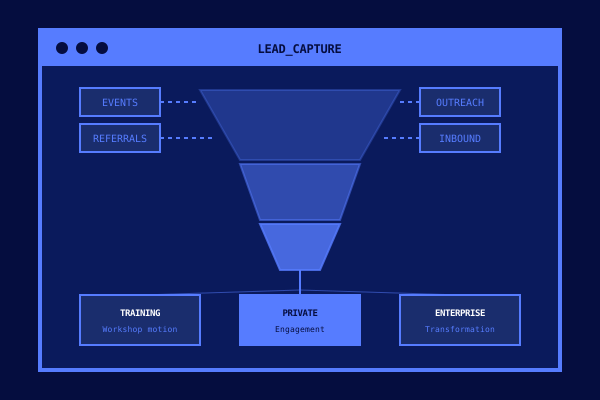
What most teams deal with today: Leads come in from events, website forms, referrals, outbound campaigns, partner introductions. They land in different inboxes, different Slack channels, different spreadsheets. Someone adds them to the CRM manually, maybe with the right information, maybe not. Routing is whoever gets to it first. Follow-up timing depends on when the rep checks their queue, which could be hours or days.
The warm referral from your board member? Sitting in a sales manager’s inbox while they’re at an offsite. The VP who stopped by your event booth and said “let’s talk next week”? Their business card is in someone’s jacket pocket.
What changes with an operating model: Every lead, regardless of source, is automatically captured, enriched, and scored. The system pulls firmographic data, tech stack information, funding stage, recent news, and behavioral signals like what pages they visited or which sessions they attended at your event.
But it goes further than enrichment. The system identifies the buying persona. Is this an individual contributor exploring options, or a VP with budget authority? Is this a company that fits your enterprise motion, or would they be better served by a lighter-touch engagement? The lead gets categorized, scored, and routed to the right rep with the right sales motion attached, all before anyone opens their laptop.
The moment that changes how leaders think about this: It’s 7am on a Monday. Your sales team hasn’t logged in yet. But the system has already processed 23 leads from Friday’s event, enriched every one of them, flagged 4 as high-priority based on company size and engagement signals, and queued personalized follow-up drafts for each rep to review when they sit down. The VP who visited your booth? She’s already been matched to your enterprise motion with a draft email referencing the specific session she attended.
No lead sat in a queue over the weekend. No warm introduction went cold.
2. Discovery and Preparation
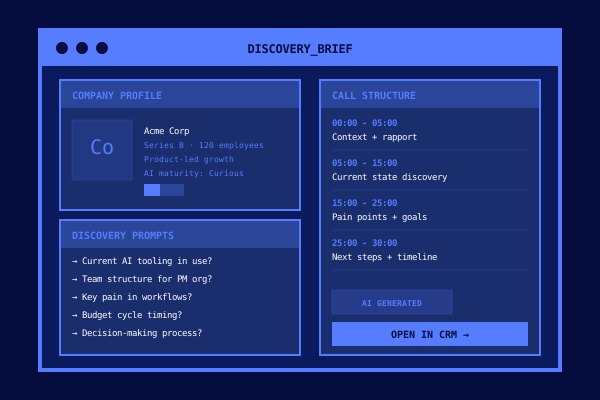
What most teams deal with today: A rep has a discovery call at 2pm. Around 1:40, they start scrambling. Salesforce for account history. LinkedIn for the contact’s background. The company’s website for recent news. Gong for clips from the last conversation. Google for anything else that might be useful.
They walk into the call with fragments of information, half-remembered from a rushed 20-minute research session. The discovery questions are generic because there wasn’t time to tailor them. The prospect can tell.
What changes with an operating model: Before every call, the system compiles a structured briefing. Company overview, org structure, product landscape, recent executive hires, funding rounds, competitive moves, and any prior interactions your team has had with anyone at the account. Not just raw data either. It synthesizes what matters: this company is growing their product team, they’re in a competitive market that requires faster iteration, and the last time your colleague spoke with them six months ago, they weren’t ready to buy but mentioned budget review in Q1.
The system generates discovery questions tailored to this specific prospect. Not generic “what are your pain points” questions, but questions informed by what it knows about the company’s situation.
The moment: A rep opens their briefing ten minutes before a call. The prospect’s company just posted four new product roles. Their CPO gave a talk last month about scaling cross-functional product teams. A competitor in their space closed a deal with you last quarter. The briefing flags all of this and suggests a discovery angle around scaling challenges. The rep walks in knowing the account better than the prospect expects, and the conversation goes from “tell me about your business” to “I noticed you’re scaling your product org pretty aggressively. What’s driving that?”
The prospect leans forward. That’s when you know the deal has shifted.
3. Proposal and Deal Construction
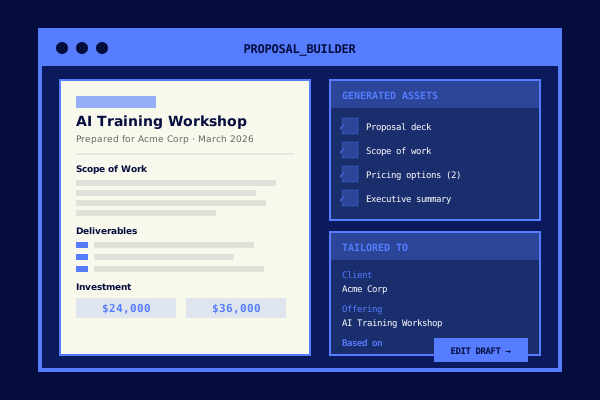
What most teams deal with today: Discovery goes great. Now the rep needs to put together a proposal. They open a blank template. Pull pricing from a spreadsheet or ask their manager. Copy relevant case study blurbs from the marketing folder. Try to remember everything the prospect said and translate it into a scope of work. Loop in a solutions architect for review. Go back and forth on pricing tiers.
This takes days. Sometimes a week. By the time the proposal lands in the prospect’s inbox, their internal momentum has faded. They’ve moved on to other priorities. You’re now chasing a deal that was warm and is going cold.
What changes with an operating model: The system takes the discovery notes, whether from the rep’s call summary or automatically transcribed, and generates a draft proposal. Scope of work mapped to what the prospect actually said they needed. Pricing options pulled from your standard catalog and configured for their company size and engagement type. A presentation deck with the prospect’s context woven throughout: their company, their challenges, their goals. Relevant case studies selected automatically based on industry and company profile.
The rep reviews, adjusts, and sends. Not in days. In hours. Sometimes the same afternoon as the discovery call.
The moment: A rep finishes a strong discovery call at 2pm. By 2:30, they have a complete proposal package sitting in their drafts: a tailored scope of work referencing specific pain points from the call, three pricing tiers with ROI projections based on the prospect’s company size, a deck with the prospect’s logo and context on every slide, and two case studies from companies in the same industry. They review it, make a few tweaks, and send it at 3:15. The prospect replies at 4pm: “This is exactly what we were looking for. Can we get the team together next week to discuss?”
That deal just accelerated by a week because you eliminated the proposal bottleneck.
4. Pipeline and Deal Management
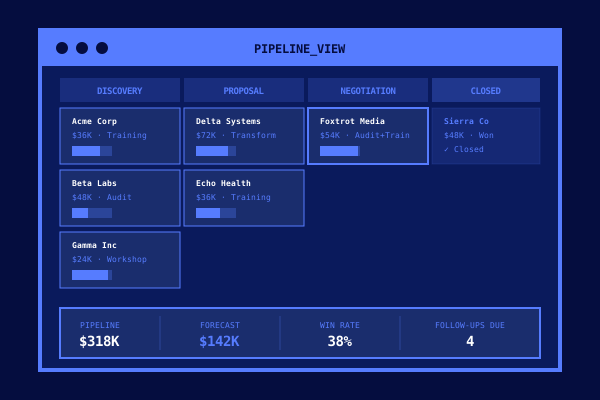
What most teams deal with today: Pipeline review is archaeology. Managers spend Monday mornings asking reps to update their deals in Salesforce. Reps do it from memory, optimistically. A deal that hasn’t had a meeting in three weeks still shows as “on track” because the rep believes the prospect is just busy. The forecast is a collection of individual opinions dressed up as data.
Stalled deals sit unnoticed for weeks. Follow-ups happen when reps remember, not when the deal needs them. By the time someone flags a problem, it’s too late to save it.
What changes with an operating model: The system tracks deal health continuously based on actual signals: email engagement, meeting frequency, response times, how long the deal has been in its current stage compared to your historical average. It doesn’t rely on what the rep says is happening. It watches what’s actually happening.
Stalled deals get flagged with suggested re-engagement actions. Deals moving faster than average get highlighted so leadership can prioritize resources. Follow-ups are auto-scheduled based on deal stage and engagement patterns. And the forecast? Built on historical conversion rates and current deal velocity, not gut feel.
The moment: Monday morning. A sales leader opens their dashboard and sees three things immediately: two deals have gone dark in the last ten days (both were in late-stage negotiations), one deal is moving 50% faster than average and needs executive sponsorship to close this quarter, and the forecast has shifted by 15% since Friday based on engagement patterns across the pipeline. None of this required a single rep to update a single field. The system saw the signals and surfaced them.
The leader cancels the hour-long pipeline review meeting. They already know where to focus.
5. Delivery Orchestration
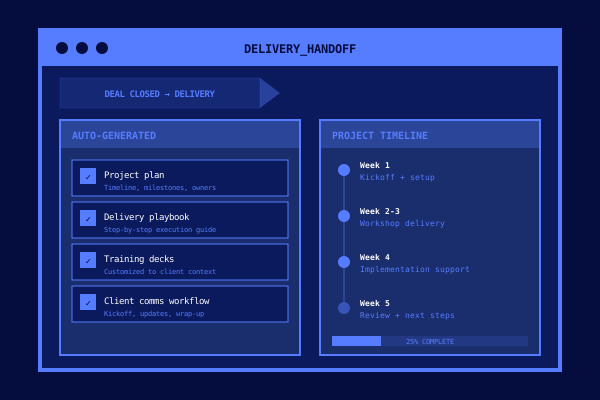
What most teams deal with today: A deal closes. Celebrations. High-fives. Then the handoff happens, and everything slows down.
The delivery team gets a forwarded email chain with a contract attached. They have to reconstruct what was promised from scattered notes and sales conversations they weren’t part of. The client’s main contact information is buried in a Salesforce field somewhere. The kickoff call takes two weeks to schedule because nobody knows who’s responsible for what.
During that gap, the client’s excitement fades. They start wondering if they made the right choice. The experience goes from “this company really understands us” to “wait, didn’t we already explain all of this to the sales team?”
What changes with an operating model: The moment a deal closes, the system generates a complete handoff package. Project plan with milestones and owner assignments. Internal brief with full deal context: what was promised, what the client’s expectations are, who the key contacts are, and what the delivery team needs to know about the client’s organization. Onboarding sequences are triggered automatically. The client gets a personalized welcome email. The kickoff meeting is scheduled.
All of this happens without a single meeting between sales and delivery to “transfer knowledge.” The knowledge is already in the system.
The moment: A deal closes on Friday afternoon. By Monday morning, the delivery team has a complete project plan, the client has received an onboarding email with their kickoff date, and the project lead has a brief that includes the client’s stated goals, their org structure, and the specific pain points that drove the purchase. The client’s first interaction with the delivery team feels seamless because the delivery team isn’t starting from scratch. They’re starting from everything the sales process already learned.
The client tells their CFO: “These people have their act together.” That’s how you build a reference customer.
6. Client Intelligence and Expansion
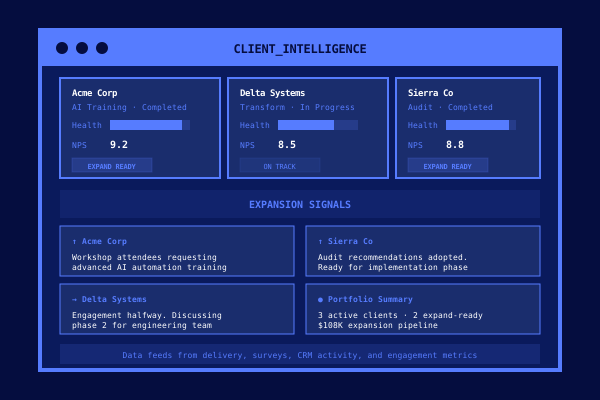
What most teams deal with today: Account management is reactive. You find out a client is unhappy when they don’t respond to the renewal email. Expansion opportunities surface randomly, usually because a rep mentions something they heard on a call. There’s no systematic way to see across your client base and spot patterns.
Your best accounts are probably ready to buy more. Your at-risk accounts are probably showing warning signs. But nobody has time to monitor all of them, so both opportunities and risks go unnoticed until it’s too late.
What changes with an operating model: Engagement data feeds back into the system continuously. Client health scores aggregate signals from delivery outcomes, communication patterns, usage data, and satisfaction indicators. The system spots expansion signals that humans would miss: a client’s team growing by 30%, increased engagement with your advanced content, or questions about capabilities they haven’t purchased yet.
Renewal risk gets flagged months in advance based on declining engagement or delivery issues. Account managers get proactive alerts with suggested actions and draft outreach, not a surprise churn notification.
The moment: An account manager gets an alert: a client they haven’t spoken to in six weeks just expanded their product team by 40%. They’ve been accessing advanced resources. Their delivery satisfaction scores are high. The system has flagged them as an expansion opportunity and drafted a check-in email that references their team growth and suggests a conversation about scaling their engagement.
The account manager sends the note. The client responds: “Actually, we were just talking about this internally. Can you put together some options for us?”
That expansion deal started three months before the renewal conversation would have happened. The system saw the signal. The human closed the deal.
The Results When This Works
We’ve seen these results from a GTM team running this exact operating model:
- 50% shorter sales cycle because deals move from first touch to close with less friction at every stage
- 35% higher close rate with AI-prepared discovery, personalized proposals, and consistent follow-up
- 2x pipeline value from better lead qualification and no leads falling through the cracks
- 20 hours per month reclaimed per rep by eliminating manual research, drafting, and data entry
Those numbers are significant on their own. But the compounding effect is what makes this a structural advantage. The system learns from every rep edit, every deal outcome, every engagement signal. Six months in, the lead scoring is more accurate, the email drafts require fewer edits, and the pipeline forecast is genuinely reliable. You get better without adding headcount.
Get the Full Implementation Playbook
See how we build AI operating models for GTM teams. Workflow mapping, integration architecture, and the exact process from discovery to pipeline impact.
If You’re Not Ready to Build, Start Here
Three things you can do this week:
Run a time audit. Have your reps track one week of activity. Not what they think they spend time on, what they actually spend time on. Log every research session, every CRM update, every email draft, every admin task. Most leaders are shocked by the ratio of selling to not-selling.
Map your lead-to-close workflow. Draw it out end-to-end. Every lead source, every handoff, every manual step, every place where context gets lost between people or systems. You’ll find gaps you didn’t know existed.
Pick the biggest time sink and ask one question: What would this look like if AI handled 80% of it and the rep just reviewed and approved? That’s your starting point.
We build AI operating models for GTM teams. If you want to skip the DIY route and get this running in weeks instead of months, book a 30-minute discovery call. We’ll map your workflow and show you exactly where an operating model will drive more pipeline with the team you already have.